
Vent cools your Ramjet; Surge lasts 10 seconds. You can equip abilities between each planet's series of races, then use them in a race when you have enough battery energy. The Star Wars Galactic Racer abilities below cover nine base abilities, with upgrades adding further benefits.
What abilities are there in Star Wars Galactic Racer?
The nine base abilities are Autopilot, Concussion Mine, Ion Bolt, Ion Blast, Shield, Shockwave, Status Scrubber, Surge, and Vent.
| Ability | What it does | What to plan around |
|---|---|---|
| Autopilot | Flies your vehicle automatically for 10 seconds and reduces Ramjet heating while active. | Activate before a difficult section. |
| Concussion Mine | Drops a proximity charge that applies Concussed and System Malfunction to nearby opponents. | The charge needs an opponent nearby to trigger. |
| Ion Bolt | Locks onto the closest nearby opponent and applies Disrupted. | Its target is the closest nearby racer. |
| Ion Blast | A Crash Ability that applies Disrupted to nearby opponents. After reset, you gain considerably increased Speed for each affected opponent. | Its speed benefit depends on affected opponents. |
| Shield | Applies Shielded for 10 seconds, reducing damage from racers and environmental collisions. | It reduces damage rather than promising immunity. |
| Shockwave | Pushes nearby opponents away and applies System Malfunction. | Use it when nearby racers are crowding you. |
| Status Scrubber | Clears negative status effects and restores one battery energy if any are cleared. | The energy return requires a status to be removed. |
| Surge | Applies Surging for 10 seconds; impact removes it, and overtakes extend it. | Clean passing keeps the benefit going. |
| Vent | Applies Cooled and reduces Ramjet heat. | Time it around overheating. |
Nine describes the base list, not every upgraded variant. Autopilot upgrades, for example, can extend its duration and grant Overcharged while it is active.
How do you use abilities and manage battery energy?
Equip your abilities between races, complete the startup sequence, and check the battery in the lower-left HUD before spending energy.
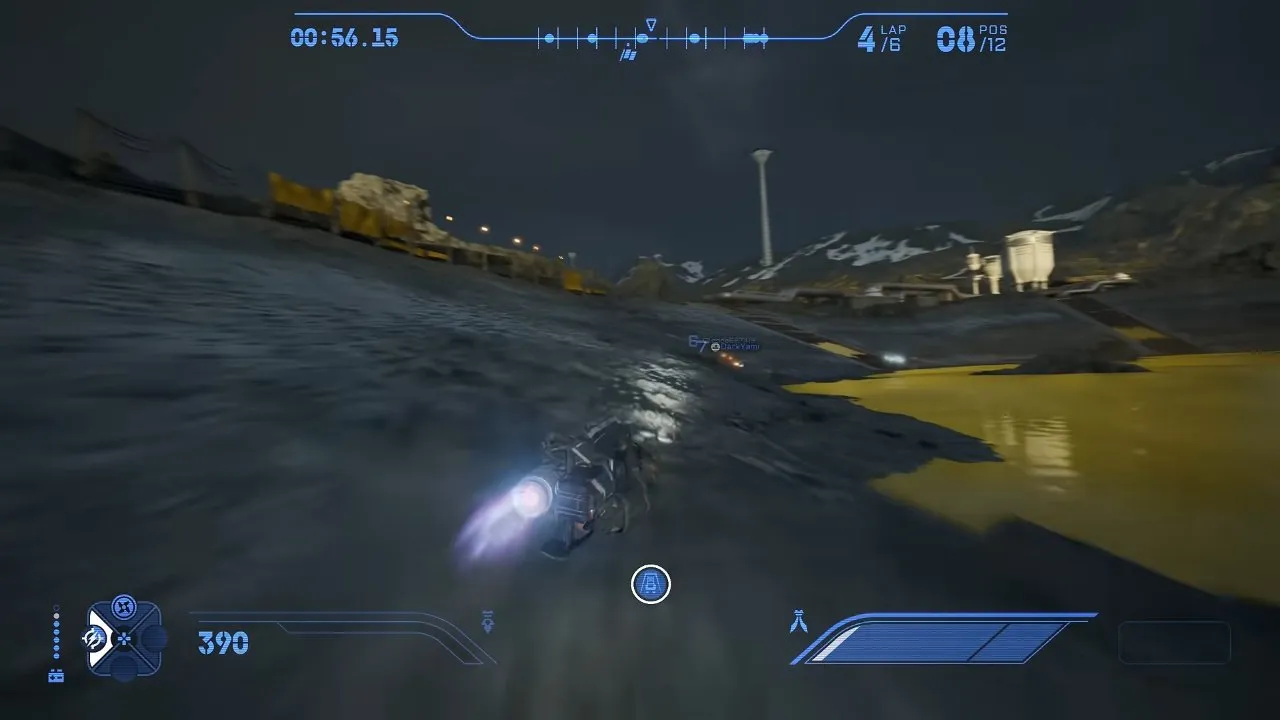
The dots beside the battery icon might look like another speed meter at a glance. They represent your remaining ability resource. The screenshot puts them beside the ability wheel, so you can check that corner without confusing it with the boost display on the right.
- Prepare your systems before the start. Complete the startup sequence and read its system labels to see what you are preparing. Successful preparation also means your afterburner starts fully refilled; skipping it can leave you with none.
- Check your battery before activating an ability. You need enough energy to use it. Watch the lower-left battery display to keep track of what remains.
- Keep some energy for the finish. Some players report forgetting abilities while concentrating on Ramjet, drifting, and afterburner. Spending everything immediately leaves fewer options later; check that you still have battery left before committing to another use.
Battery upgrades give you more opportunities to use equipped abilities. If your speed setup depends on Vent and Surge, battery deserves a place alongside Ramjet and afterburner improvements in your Star Wars Galactic Racer upgrades.
Exact PC, PS5, and Xbox activation buttons, rebinding options, per-ability energy costs, slot limits, and cooldowns still need confirmation. Autopilot's starting unlock status also remains unclear, so check what you actually own before planning around it.
Should you use Autopilot, Vent, or Surge for a speed build?
Choose Autopilot for difficult sections, Vent for Ramjet heat, and Surge for extra speed on a clear route.
Autopilot: recommended while learning a track
Some players recommend activating Autopilot just before a difficult section or an imminent crash, especially when learning an unfamiliar layout. Its base effect is 10 seconds of automatic driving with reduced Ramjet heating. You can confirm the effect through the vehicle driving automatically during that window. Treat it as help with navigation, not a guarantee that every risky approach is safe.
Vent: cool an overheating Ramjet
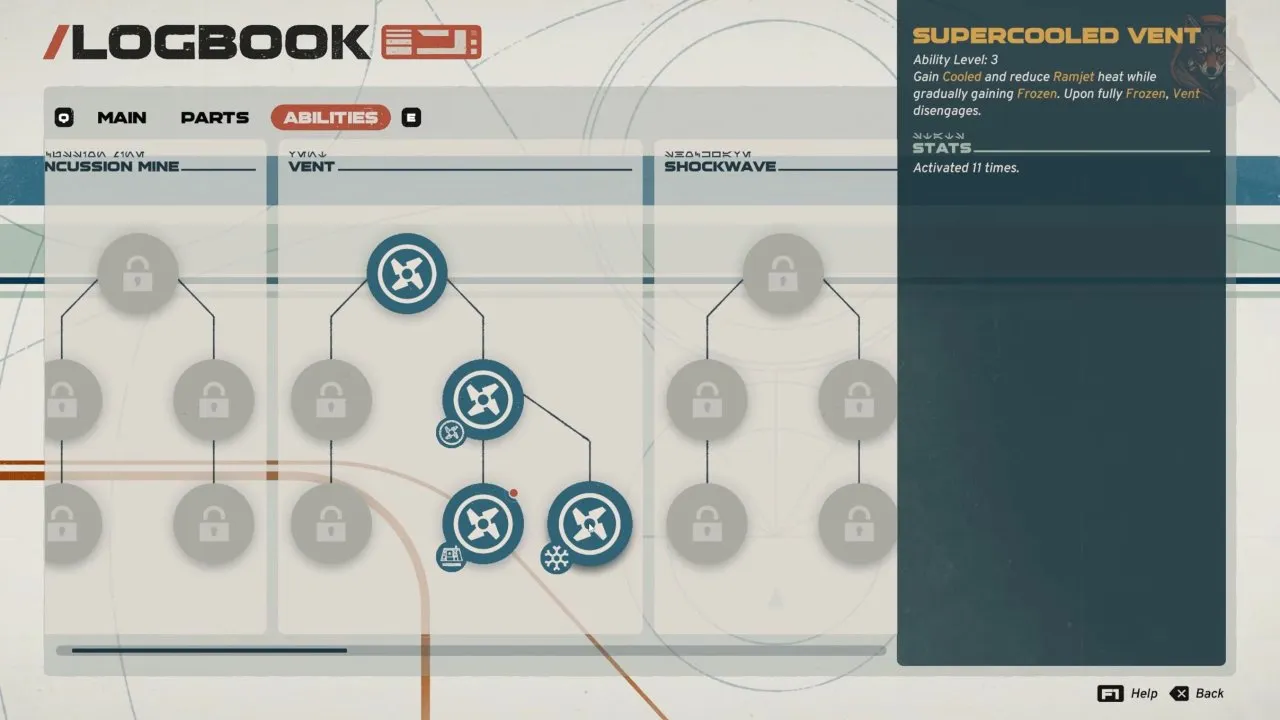
Activate Vent when the Ramjet goes into the red and starts overheating. You get Cooled and reduced heat, helping you keep using the Ramjet longer. Check that the heat drops after activation.
The Logbook screenshot shows Vent's upgrade tree. The right-hand description explicitly includes reducing Ramjet heat, which is the reason to pair Vent with sustained Ramjet use.
Surge: accelerate where you can avoid contact

Use Surge between boosts to maintain pace, or alongside afterburner or Ramjet on a clear section where you can control the acceleration. The screenshot labels Surge as another way to keep your pace; its base Surging effect lasts 10 seconds.

Overtake cleanly to extend Surge. The visible SURGE EXTENDED (OVERTAKE) notification confirms that the pass extended the effect. Impact removes Surging, so forcing a pass into a wall can waste the speed you just gained. Wait for a cleaner line if contact looks likely.
Which abilities help when opponents keep hitting you?
Shield reduces collision damage, Shockwave creates space, and Ion Bolt disrupts the closest nearby opponent.
Shield: recommended for repeated collisions
Choose Shield when racers keep ramming you or pinning you against walls. Its 10-second Shielded effect reduces racer and environmental collision damage. Watch for Shielded, and remember that reduced damage still leaves a reason to avoid the wall.
Shockwave or Ion Bolt: fight for space
Shockwave pushes nearby opponents away and applies System Malfunction. The push is the immediate visible result to check. Ion Bolt instead locks onto the closest nearby opponent and applies Disrupted, so think about who is nearest before using it.
Status Scrubber: clear a negative effect
Use Status Scrubber when a negative status is affecting you. Confirm that the status clears, then check the battery: removing at least one status restores one energy. Activating it with nothing to remove does not meet that refund condition.
Some players describe Flame Vent as combining an attack with Vent cooling, and a “surge shield” as protection on lava or acid routes. Their formal upgrade relationships still need confirmation. Do not assume ordinary Shield makes those hazardous shortcuts safe.
How do you unlock and upgrade abilities?
Buy an Ability Pack for 2,500 Credits at Hibi's Shop on each planet during a tour, or earn an ability from an occasional planet-map event reward.
The pack presents a choice. Pick an ability you do not own to unlock it for equipping, then confirm it is available in your ability selection. If you already own an ability, an upgraded version can sometimes appear in a pack; check the offered effect before spending. Full upgrade values still need confirmation.
Hibi's workshop in each planet's Paddock also lets you fit earned or purchased parts that provide stats and abilities. Ability Packs compete with vehicle upgrades and fault repairs for your Credits. If a fault needs fixing, keeping those Credits for repairs can be the steadier choice than buying another ability immediately.
You now have a base ability list, a way to check your remaining energy, and a timing plan for your next race. Next, fit those choices into your Star Wars Galactic Racer best build, or review Star Wars Galactic Racer tips if you are still learning the race systems.